
Residential care incident reports
Residential care incident-reporting software
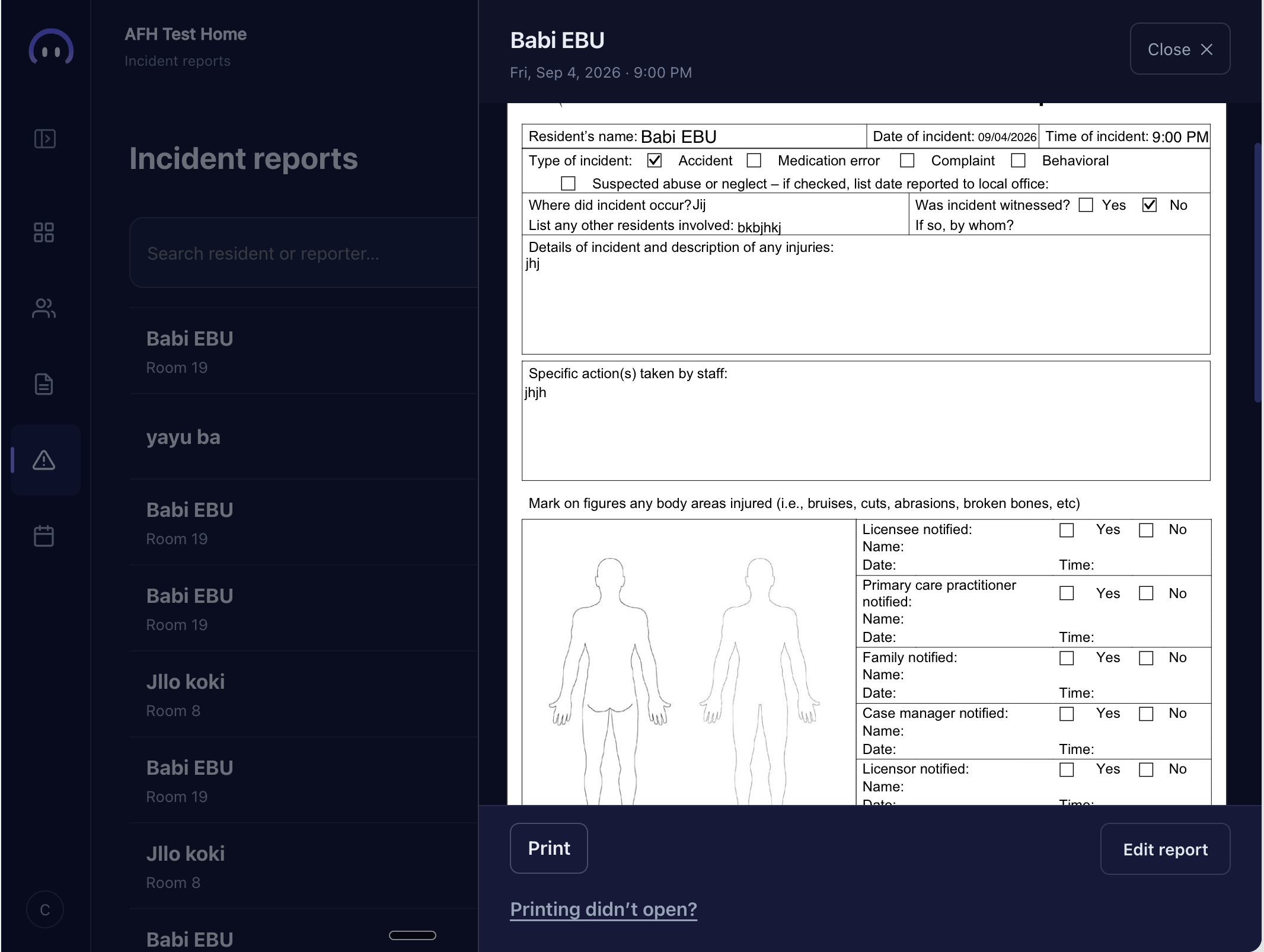
CareStock brings incident details into one guided report: who was involved, when and where it happened, the incident type, and a written account. The completed view keeps those details together and provides a printable form.
01
Give the details a clear place.
The guided report asks for the people involved, the date and time, the location, and the incident type. These prompts help the caregiver work through the report in a consistent order.
02
Keep the account in the caregiver’s words.
A written description accompanies the structured fields. Caregivers can record what happened in their own words, keeping the account together with the surrounding details.
03
Review the completed report.
The product walkthrough shows a completed incident report with a printable form. Review the demonstrated screen to see how the report is presented before deciding whether CareStock fits your home.
A closer look.
What information goes into a report?
The demonstrated report includes who was involved, when and where the incident happened, the type of incident, and a written description.
Is there a printable view?
Yes. The completed incident-report screen shown in the product walkthrough includes a printable form.
Does the report submit itself to an outside agency?
The workflow described here records incident details within CareStock. It does not represent an automatic submission to an outside agency.
Connected workflows
See the rest of the day.
Limited early access
Let’s talk about your home.
Tell us about your work. Our team reviews each request and approves homes for access.